
Search Our Collection
Search across all items in our online collection by keyword, name, or location. You can wrap search terms “in quotes” to find exact matches or exclude a term by typing a -minus symbol before it.
Viewing Tips: Click on any photo to enter a fullscreen view. For documents and newspaper clippings, click the “Download” button at the bottom of the post to open the file in a larger viewer on archive.org.
Downloading Items
All of the photos and documents in our online collection can be freely downloaded for personal use. To save a web quality copy of any image, right click on the photo and select “Save Image As…” On a mobile device, press and hold, then tap save.
The museum hosts print quality photos and PDF documents on the Internet Archive, a non-profit digital library. To download these items, scroll to the bottom of any post and tap the “Download” button. You’ll be redirected to archive.org.
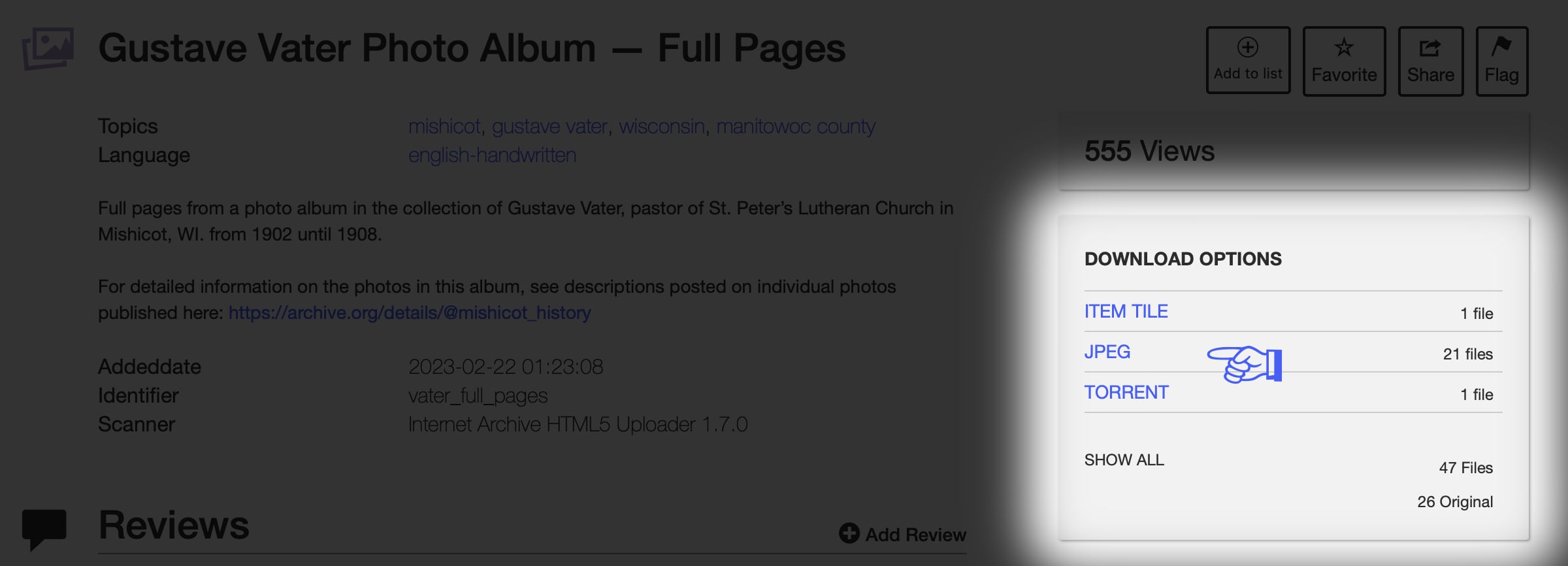
On the Internet Archive, you’ll find a menu below the item labeled “Download Options.” Click on your desired format and press the download button.
If you have any further questions, please contact the museum.
External Links & Research Resources
Visit our Research Resources page for links to free online resources and tips for getting started compiling a family history.
 Mishicot Historical Museum